 Craft Apps Guide
Start a design.
Open SolidCraft and create an empty design.
CHECK
the 3D workspace and feature timeline are available.
SolidCraft is an open-source app for parametric 3D modeling. Start with a constrained sketch, build a solid on a feature timeline, then change a dimension and rebuild the model. Its source is published at bherbruck/solidcraft; ArtCraft's official Crafting Apps directory lists CADCraft instead.
Related Tool · Open Source · Early Development
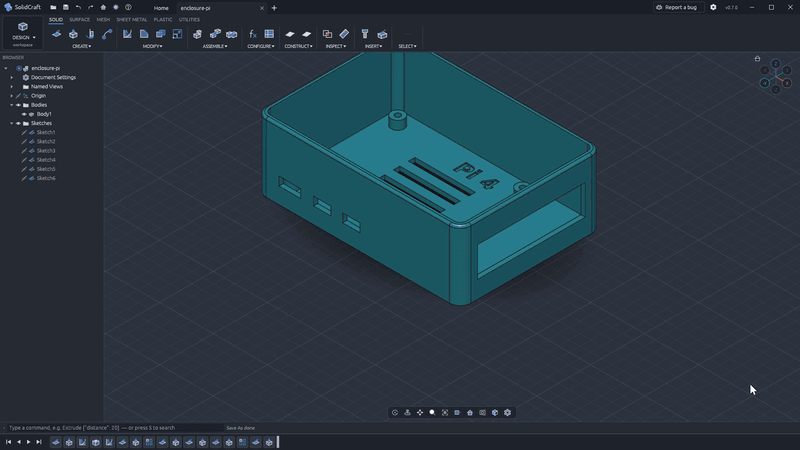
Official project screenshot
SolidCraft is not listed among ArtCraft's 13 official Crafting Apps. Its project is hosted in the bherbruck GitHub account. ArtCraft separately lists CADCraft in its own directory. Treat them as separate products when choosing instructions or a download.
| What matters | SolidCraft | CADCraft |
|---|---|---|
| Main task | Parametric 3D parts and assemblies | CAD drawing and drafting workflows |
| Typical workflow | Constrained sketch, solid features, editable timeline | Commands, layers, dimensions, hatches, blocks and layouts |
| Files highlighted by the project | STEP, IGES and mesh formats such as STL | DXF/DWG drawing workflows and PDF/SVG/PNG export |
| Official source | github.com/bherbruck/solidcraft | getartcraft.com/apps/cadcraft and github.com/storytold/cadcraft |
| AI agent access | Built-in MCP server documented | Agent/CLI workflow documented |
Choose SolidCraft when you want to build a parametric 3D part. Choose CADCraft when you need a drawing-oriented CAD workflow. Neither name makes the other project an official download source.
Goal: Create a dimensioned solid, change its size, save the editable design, and export a copy.
Open SolidCraft and create an empty design.
the 3D workspace and feature timeline are available.
Draw one on a base plane and add width and height dimensions.
the sketch has controlled measurements.
Extrude the closed sketch into a simple block.
a solid body appears in the viewport and timeline.
Edit one sketch dimension and let the model rebuild.
the body changes size while retaining the editable steps.
Save the native .solidcraft design. Export a separate STEP or STL copy for the destination workflow.
you retain both the editable project and an exchange file.
SolidCraft's MCP server lets an AI agent run modeling commands, inspect and measure a design, and export results. The same app also supports direct editing. Check dimensions and geometry in the finished model before using it for fabrication or sharing.