 Craft Apps Guide
Create the parent frame
Draw a 400 px wide frame. Add Auto Layout in the Design panel and select vertical direction. Set padding 24 and gap 16.
CHECK
Children follow a vertical flow; parent height can Hug content.
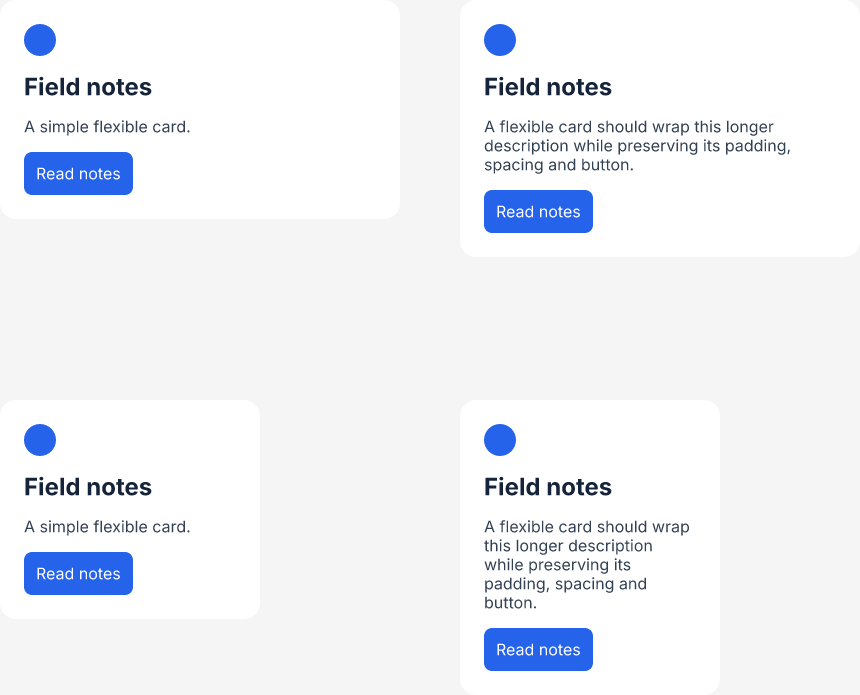
Build a vertical card whose description wraps and whose height follows its content. The example uses a nested button and checks both long text and narrow width before saving.
Tests on 20 October 2026 used official FigCraft 0.7.0 on macOS 27.0.1, Apple Silicon. Native CLI operations use FigCraft’s own engine and renderer; rendered images are not desktop UI screenshots.
Use a fixed card width, vertical flow, 24 px padding and 16 px gap. Set the card’s vertical sizing to Hug, the description’s horizontal sizing to Fill and its vertical sizing to Hug. The button is a nested horizontal frame with 12 px padding and Hug sizing.
Draw a 400 px wide frame. Add Auto Layout in the Design panel and select vertical direction. Set padding 24 and gap 16.
Children follow a vertical flow; parent height can Hug content.
If this fails: If objects stay free-positioned, check they are children of the frame and not absolute.
Keep: cards.figcraft
Add a 32 px circle, a 24 px heading, then a 16 px description. Make text width Fill and height Hug.
The description takes the available inner width and wraps.
If this fails: If it grows sideways, replace horizontal Hug with Fill or a fixed text width.
Keep: cards.figcraft
Create a horizontal frame with 12 px padding, add Read notes text, and use Hug in both directions.
The button fits its label and remains below the paragraph.
If this fails: If the label overflows, check the button and text sizing together.
Keep: cards.figcraft
Duplicate into 400 and 260 px versions; replace one description with the long sample. Save, reopen and render/check each version.
Longer/narrower text increases height without covering the button.
If this fails: Fix clipping or fixed-height text before using the card in a real screen.
Keep: cards.figcraft + comparison PNG
| Task | Observed result | Boundary / next check |
|---|---|---|
| Short text, 400 px | 400 × 219 px | Single description line. |
| Long text, 400 px | 400 × 257 px | Description wraps to three lines. |
| Short text, 260 px | 260 × 219 px | Button remains inside padded card. |
| Long text, 260 px | 260 × 295 px | Description wraps to five lines. |
Our four cards are independent examples, so changing one does not update the others. The separate component sample adds a main component and instance. Keep the .figcraft master; use PNG as the visual reference.
Official sources checked 20 October 2026. Test results are limited to the versions, environment and files stated above.